
PowerSchool Parent Guide

(MyPowerHub also known as PowerSchool)

PowerSchool is the centralized portal for all school updates including attendance, grades, announcements, and report cards designed to keep families informed.


1 Access the PowerSchool Portal
  • Login into your account using the below link:

https://isava.guardian.powerschool.com

2 Log In or Create an Account

You have already created a PowerSchool account?

  • If YES: Log into your account and move to Step 3.
  • If NO: Open the attached PDF guide, "Creating Parent PowerSchool Account", and follow the steps to set up your account.
3 Navigating the Dashboard

Part 1

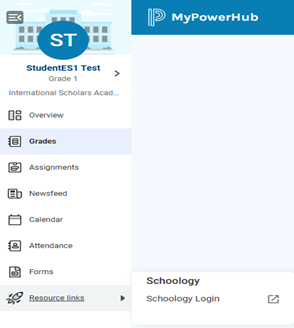
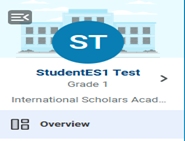
When you log in, you'll land on the PowerSchool dashboard. This is your main overview page, where you can see attendance, grades, and more. Your student's name appears in the top-left corner. If multiple students are linked, use the arrow to switch between accounts.
Part 2: How to Change Language to Arabic

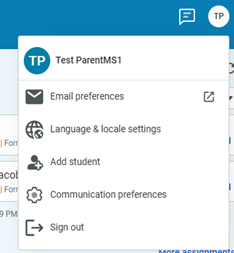
  1. Click on your initials or profile picture in the top right corner.
  2. Select Language & locale settings.
  3. Choose your desired language (e.g., Arabic).
Language & locale settings
4 Logging into Schoology – Learning Management System
  1. Click Resource Links (rocket icon at the bottom of the navigation menu) and select Schoology.
  2. This will take you to the Schoology login page.
  3. If this is your first time logging in, click “Forgot your password?”
  4. Enter the email address on file with the school.
  5. Check your inbox and follow instructions to create a new password.
Resource links to Schoology
5 Adjust Your Notifications
  1. Click your account initials (top right corner) and select Communications Preferences.
  2. Select each person's name to adjust preferences individually.
  3. Choose:
    • What information to receive via email (Calendar, Newsfeed, Messaging)
    • What should be summarized in emails
  4. Selections save automatically. Click the back arrow (top left) when finished.
6 Using the PowerSchool Mobile App
  1. Search for the PowerSchool Mobile App on Apple App Store or Google Play Store.
  2. Enter the code for International Scholars Academy: District Code TKCT.

Need Help?

If you have any questions, please reach out to our support.